For some employees, child support deductions are applied. These deductions are not considered taxable income for the recipient.
Mandatory child support withholdings are court-ordered and are deducted directly from the paying parent’s wages.
Setting Up Child Support Deductions
Before setting up a child support deduction in the system, consult with APS. APS collaborates with various state child support agencies to facilitate ACH payments. However, in some cases, remote checks for child support are printed at the New Orleans office and mailed, depending on the specific request received.
- Send Documentation: Forward the received documentation to APS so they can set up the deduction on their end.
- Follow Instructions: Adhere to the instructions provided in the court orders regarding payment processing—whether via ACH or checks.
View and Print Remote Checks:
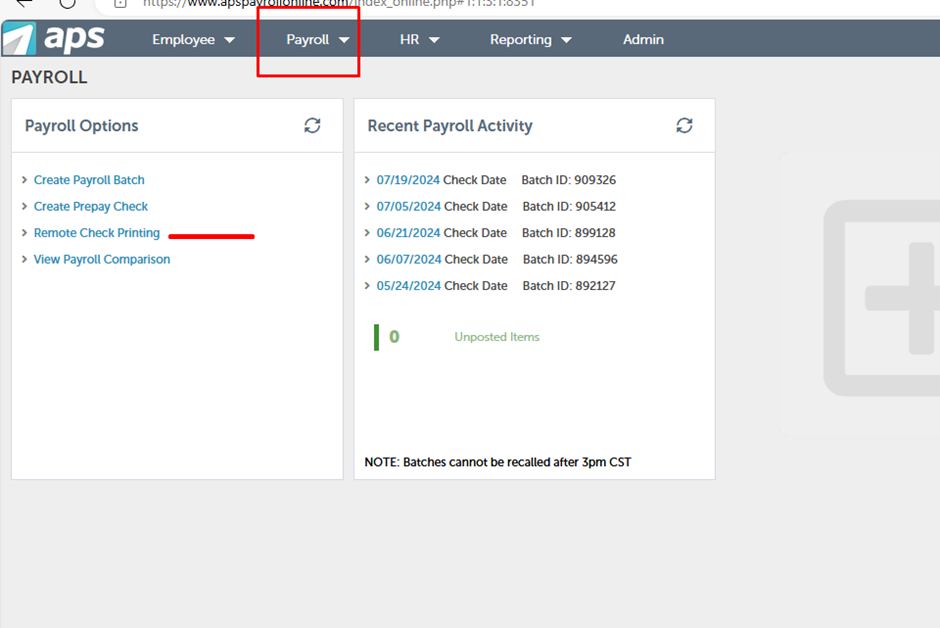
Go to Payroll > Remote Check Printing and double-click to open the payroll.
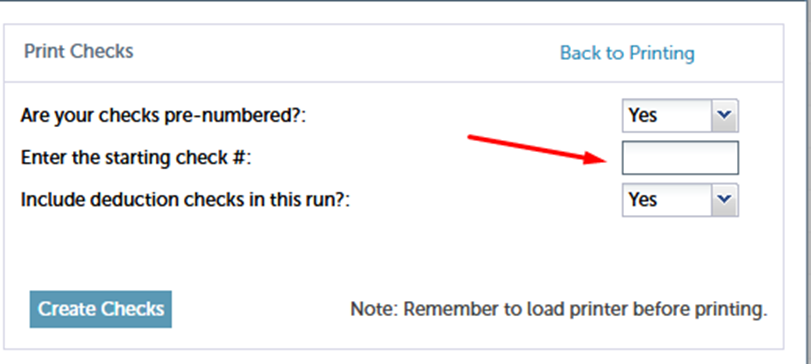
Request a 4-digit check number from the head office administrator (e.g., Elena Oganyan elenao@hosteeva.com).
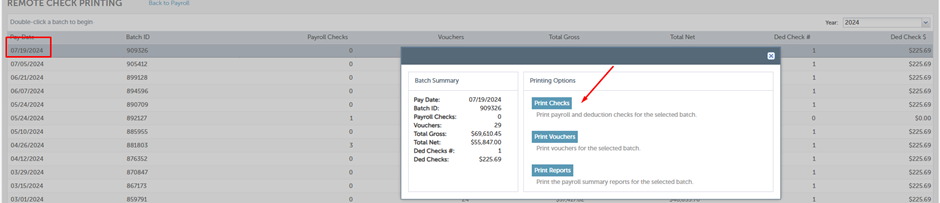
Print the checks as needed.
Send the check as a PDF file to the office administrator for mailing.
When an employee with a child support deduction no longer works with us, please refer to the IWO* Instructions or contact the Agency directly regarding “Notification of Termination of Employment or Income Status". APS will not send termination notifications to the agencies. The process is handled by the company.
* An Income Withholding Order (IWO) is an order that a court or a child support agency sends to the non-custodial parent's employer or income payor instructing them to withhold child support payments from the non-custodial parent's income.