Introduction:
1. KABA LOCK TROUBLESHOOTING
Basic Troubleshooting Steps
-
Ask Guest:
-
Are you seeing a red or green light?
-
Green Light: The code is correct. Confirm they are rotating the deadbolt properly.
-
Red Light: Incorrect code. Confirm they are at the correct unit and door.
-
-
-
Code Entry Process:
-
After entering the code:
-
The lock should flash green and beep.
-
Rotate the deadbolt, then use the handle to open the door.
-
Ask which side the lock is on:
-
Right Side Lock: Rotate the deadbolt left.
-
Left Side Lock: Rotate the deadbolt right.
-
-
-
Note: If the guest sees a green light but the deadbolt isn’t turning, the lock may be malfunctioning. Do not create a new code—immediately:
-
Notify the local team/manager.
-
Enter an URGENT work order.
Lock Variants
-
KABA 480: Has a deadbolt.
-
KABA 660: Does not have a deadbolt.
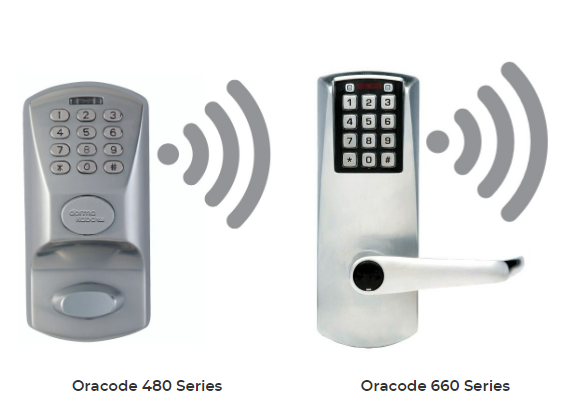
No Lights on Lock
-
If the lock shows neither green nor red, the batteries are likely dead.
-
Enter an URGENT work order.
-
Contact the local manager/team via text or call.
-
Additional Support
-
Share the “How to Open Your Kaba Lock” video link with guests if needed.
-
If the property has a gate/building entrance, confirm the guest is using the correct gate code.
2. IF GUEST SEES A RED LIGHT
Troubleshooting Steps:
-
Confirm:
-
Unit number.
-
Correct Kaba code.
-
It is past check-in time (codes won’t work earlier).
-
-
Most codes begin with 2*. Ensure full and proper entry.
-
After 2 failed attempts:
-
Provide a 6-digit code (1st user) without symbols.
-
Wait 30 seconds if the lock flashes red (temporary lockout).
-
For emergencies, use the “top guest code” (omit 8/#).
-
-
If the issue persists, notify local management.
3. WIFI TROUBLESHOOTING
Steps:
-
Confirm they are on the correct network.
-
Verify the correct password is being used.
-
Ask if they’ve power-cycled the router (usually located in the living room or master bedroom).
-
If still not working:
-
Send a message to the local manager.
-
Enter a work order with detailed notes.
-
4. FRIDGE ISSUES
Common Issues:
-
Recently stocked with warm groceries – can take 12–24 hours to cool.
-
Settings too high – may cause freezing (like an AC unit).
Troubleshooting:
-
Ask if the freezer is working.
-
If yes, the fridge should cool via freezer airflow.
-
-
Recommend minimal door opening.
-
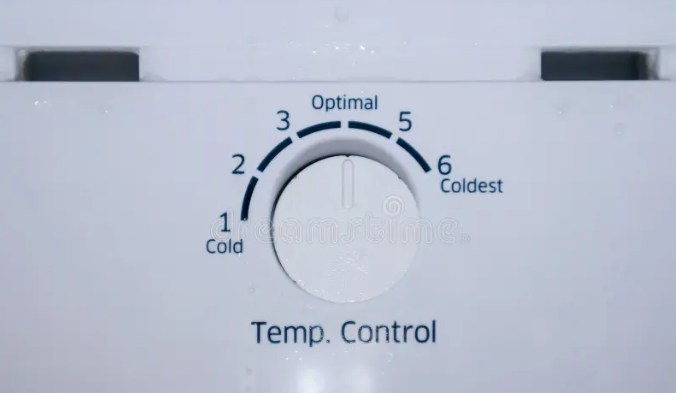
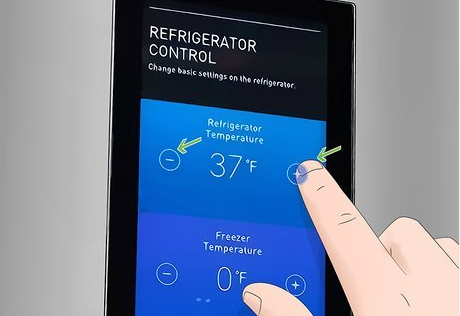
Verify:
-
Temp set to 40°F or middle setting.
-
Vents are unobstructed.
-
-
Before entering a work order:
-
Inform the guest that an appliance vendor may be called.
-
5. AC ISSUES
Troubleshooting:
-
Ask the current room temperature and the thermostat set temperature.
-
Do not set below 70°F.
-
-
AC can cool only 18°F below the outside temp.
-
Check for open doors/windows:
-
“DC” or “DO” on thermostat = coastal green air system shutoff.
-
It may take up to 5 minutes to resume after closing all openings.
-
-
If the AC is set below 65°F, the system may freeze.
-
Ask the guest to raise to 74°F.
-
-
Is it blowing air?
-
If not, ask the guest to check the breaker box (laundry room, behind the door or picture).
-
-
Work Order: Include detailed information and all steps taken.
6. TELEVISION ISSUES
Steps:
-
Identify which TV (Living Room, Bedroom, etc.).
-
Check if the TV has power and is plugged in.
-
Getting different channels on the TV
-
Go to the "Menu" first and choose "Home"
-
Then scroll down to the "Settings" and choose the "All Settings" button.
-
After that, please select "Broadcasting" and choose the "Auto program", which will be the first option, and click start to kick it off. When asked to choose between "Air or Cable", please select "Both", which is the first option again, and wait for the channels to load.
-
-
If no signal:
-
Test all inputs.
-
Ensure the cable/satellite box is ON.
-
If the remote has an “SAT” button, it must be pressed to control the TV.
-
-
Work Order:
-
Include which room, and what troubleshooting was done.
-
Note if the guest declined to troubleshoot.
-
7. EARLY CHECK-IN PROCESS
Guidelines:
-
If back-to-back booking, check-in cannot be before 4 PM (3 PM Gulf Coast).
-
If no prior check-out and the unit is clean:
-
Approve check-in at 1 PM (12 PM Gulf Coast).
-
Notify Area Manager.
-
Ensure early access Kaba code is issued.
-
Note: Review the latest features or tools related to early check-in approvals.
8. LATE CHECK-OUT PROCESS
Guidelines:
-
If the unit is back-to-back, no late check-out is allowed.
-
Guests may request late checkout on the day of departure:
-
Do not promise or imply it’s likely—ask them to call the morning of.
-
-
Script:
“…because so many things can change on the property’s booking calendar, we cannot approve any late checkouts until the night before check-out at the earliest…”
Approval Tiers:
-
Before 9 AM:
-
Approve 11 AM checkout, notify Area Manager.
-
-
11:01 AM – 12 PM: Requires Area Manager approval.
-
After 12 PM: Only with an additional night booking (max 25% discount).
9. PARKING POLICY
-
We cannot issue extra parking passes.
-
Guests may check with on-site security about purchasing additional parking.
-
In select locations (e.g., Gulf Coast, Myrtle Beach), guests may park extra vehicles at the local office.
Gulf Coast Office Address:24953 Perdido Beach Blvd
10. EXTRA TOWELS & SUPPLIES
-
We provide a one-time supply of:
-
Towels, linens, trash bags, toilet paper, soap.
-
-
No replenishments during stay.
-
Most units have a washer/dryer.
-
Recommend guests bring or buy:
-
Laundry detergent, extra trash bags, etc.
-
11. VIRTUAL CHECK-IN PROCESS
-
Guests must submit ID and a selfie using the link provided.
-
Script:
“Just like any hotel, we require proper identification to check in. Since there’s no front desk, we request you submit it online as part of our Express Check-In Process.”
12. FREQUENTLY ASKED QUESTIONS – GULF COAST
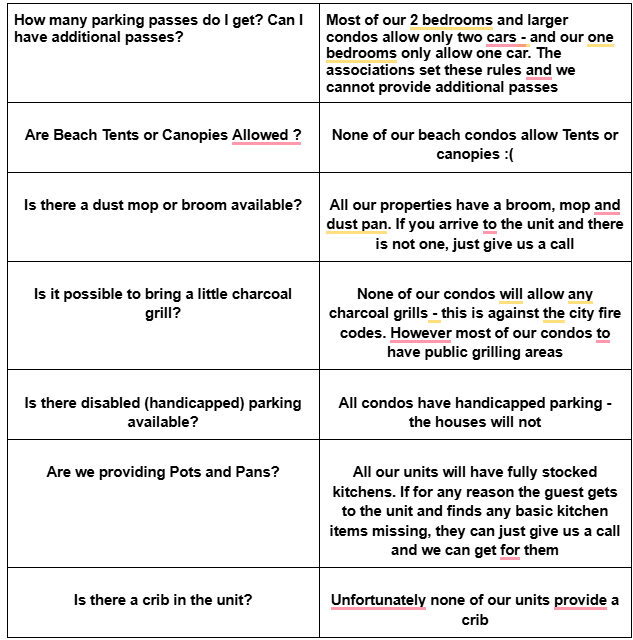
Crib & Rental Requests:
-
Refer guests to local providers:
-
Baby Beach Rentals: (850) 485-8300
-
Gulf Coast Rental Co: (251) 510-7226
-
Beach Power Rentals: (251) 978-2953
-